Multidimensional Arrays
In the previous chapter, you learned about arrays, which is also known as single dimension arrays. These are great, and something you will use a lot while programming in C. However, if you want to store data as a tabular form, like a table with rows and columns, you need to get familiar with multidimensional arrays.
A multidimensional array is basically an array of arrays.
Arrays can have any number of dimensions. In this chapter, we will introduce the most common; two-dimensional arrays (2D).
Two-Dimensional Arrays
A 2D array is also known as a matrix (a table of rows and columns).
To create a 2D array of integers, take a look at the following example:
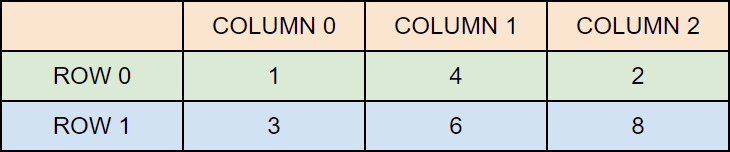
int matrix[2][3] = { {1, 4, 2}, {3, 6, 8} };
The first dimension represents the number of rows [2], while the second dimension represents the number of columns [3]. The values are placed in row-order, and can be visualized like this:
Access the Elements of a 2D Array
To access an element of a two-dimensional array, you must specify the index number of both the row and column.
This statement accesses the value of the element in the first row (0) and third column (2) of the matrix array.
Example
int matrix[2][3] = { {1, 4, 2}, {3, 6, 8} };

printf("%d",
matrix[0][2]);  // Outputs 2
Note: Remember that: Array indexes start with 0: [0] is the first element. [1] is the second element, etc.
Change Elements in a 2D Array
To change the value of an element, refer to the index number of the element in each of the dimensions:
The following example will change the value of the element in the first row (0) and first column (0):
Example
int matrix[2][3] = { {1, 4, 2}, {3, 6, 8} };
matrix[0][0] = 9;

printf("%d", matrix[0][0]);  // Now outputs 9 instead of 1
Loop Through a 2D Array
To loop through a multi-dimensional array, you need one loop for each of the array's dimensions.
The following example outputs all elements in the matrix array:
Example
int matrix[2][3] = { {1, 4, 2}, {3, 6, 8} };

int i, j;
for (i = 0;
i < 2; i++) {
  for (j = 0; j < 3; j++) {

printf("%d\n", matrix[i][j]);
  }
}
Three-Dimensional Arrays
You can also declare arrays with more than two dimensions:
Example
// A 3D array with 2 blocks, each with 4 rows and 3 columns
int example[2][4][3];
This creates a 3D array with:
2blocks (first index)4rows per block (second index)3columns per row (third index)
When to Use Multidimensional Arrays
Multidimensional arrays are useful when your data is arranged in rows and columns, like a table, grid, or matrix.
Each extra dimension adds another level of structure:
- 2D arrays (like
int scores[3][4]) are great for storing things like scores, game boards, or spreadsheets - 3D arrays (like
int cube[2][3][4]) can represent more complex structures like a set of tables or levels in a game