
Websites often display content in multiple columns (like a magazine or a newspaper).
Example
<header class="header">
<h2>Cities</h2>
</header>
<section class="section">
<nav class="nav">
<ul>
<li></li>
<li></li>
<li></li>
</ul>
</nav>
<article class="article">
<h1>London</h1>
<p>London is the capital city of England. It is the most populous city in the  United Kingdom, with a metropolitan area of over 13 million inhabitants.</p>
<p>Standing on the River Thames, London has been a major settlement for two millennia, its history going back to its founding by the Romans, who named it Londinium.</p>
</article>
</section>
<footer class="footer">
<p>Footer</p>
</footer>
HTML Layout Elements
HTML has several semantic elements that define the different parts of a web page:
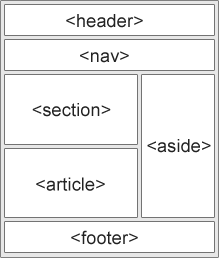
| Col 1 | Col 2 |
|---|---|
<header> - Defines a header for a document or a section <nav> - Defines a set of navigation links <section> - Defines a section in a document <article> - Defines independent, self-contained content <aside> - Defines content aside from the content (like a sidebar) <footer> - Defines a footer for a document or a section <details> - Defines additional details that the user can open and close on demand <summary> - Defines a heading for the <details> element You can read more about semantic elements in our HTML Semantics chapter. |
HTML Layout Techniques
There are four different techniques to create multicolumn layouts. Each technique has its pros and cons:
- CSS frameworks
- CSS float property
- CSS flexbox
- CSS grid
CSS Frameworks
If you want to create your layout fast, you can use a CSS framework, like W3.CSS or Bootstrap.
CSS Float Layout
You can create entire web layouts using the CSS float property. Float is easy to learn - you just need to remember how the float and clear properties work. Disadvantages: Floating elements are tied to the document flow, which may harm the flexibility. Learn more about float in our CSS Float and Clear chapter.
Example
<header class="header">
<h2>Cities</h2>
</header>
<section class="section">
<nav class="nav">
<ul>
<li></li>
<li></li>
<li></li>
</ul>
</nav>
<article class="article">
<h1>London</h1>
<p>London is the capital city of England. It is the most populous city in the  United Kingdom, with a metropolitan area of over 13 million inhabitants.</p>
<p>Standing on the River Thames, London has been a major settlement for two millennia, its history going back to its founding by the Romans, who named it Londinium.</p>
</article>
</section>
<footer class="footer">
<p>Footer</p>
</footer>
CSS Flexbox Layout
Use of flexbox ensures that elements behave predictably when the page layout must accommodate different screen sizes and different display devices.
Learn more about flexbox in our CSS Flexbox chapter.
Example
<header class="header2">
<h2>Cities</h2>
</header>
<section class="section2">
<nav class="nav2">
<ul>
<li></li>
<li></li>
<li></li>
</ul>
</nav>
<article class="article2">
<h1>London</h1>
<p>London is the capital city of England. It is the most populous city in the  United Kingdom, with a metropolitan area of over 13 million inhabitants.</p>
<p>Standing on the River Thames, London has been a major settlement for two millennia, its history going back to its founding by the Romans, who named it Londinium.</p>
</article>
</section>
<footer class="footer2">
<p>Footer</p>
</footer>
CSS Grid Layout
The CSS Grid Layout Module offers a grid-based layout system, with rows and columns, making it easier to design web pages without having to use floats and positioning.
Learn more about CSS grids in our CSS Grid Intro chapter.