Application Programming Interface
The DOM API (Application Programming Interface) is a set of Methods and Properties that allow JavaScript to change the content, structure, and style of any HTML elements.
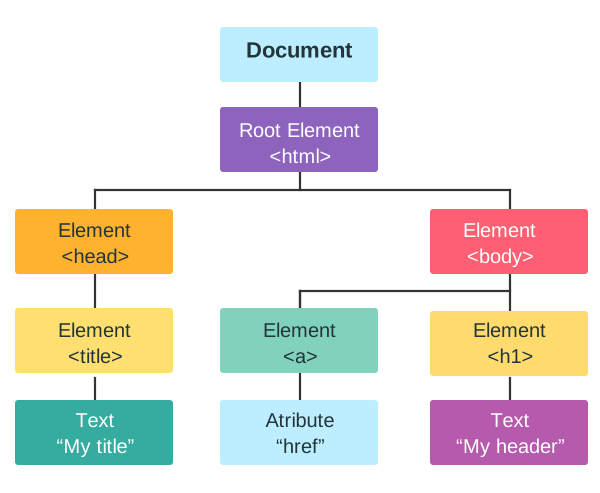
An API Method is an Action that you can do on an HTML element.
An API Property is a Value that you can access on an HTML element.
Example
<html>

<body>

<p id="demo"></p>

<script>

// Access a paragraph Element

const myPara = document.getElementById("demo");

// Change the content of the Element

myPara.innerHTML = "Hello World!";

</script>

</body>

</html>
Example Explained
document is the HTML document.
getElementById() is a document method.
myPara = getElementById("demo") retrieves the "demo" element.
innerHTML is an element property.
myPara.innerHTML = "Hello World!" changes the property.
HTML DOM API Abilities
The DOM API provides us with the ability to:
- Find and select elements
- Change element content and attributes
- Add, remove, or modify elements
- Change CSS styles
- Add event listeners to react to user input
Note: JavaScript is the Language The DOM API is a standard for how to get, change, add, or delete HTML DOM elements. JavaScript is the language used in browsers to access the DOM through the API.
API Methods and Properties
Developers use global objects like document and window as entry points to any API.
If you want to access any element in an HTML page, you always start with accessing the document object. The document object represents your web page.
To manipulate HTML with JavaScript, you first need to select an element.
Below are some examples of how you can use the document object to access HTML:
Selecting HTML Elements
| Method | Description |
|---|---|
| document.getElementById(id) | Find an element by element id |
| document.getElementsByTagName(name) | Find elements by tag name |
| document.getElementsByClassName(name) | Find elements by class name |
| document.querySelector(selector) | Find the first element that matches a CSS selector |
| document.querySelectorAll(selector) | Find all elements that match a CSS selector |
Note: The document object is the owner of all other objects in your web page.
Accessing Element Content
| Property | Description |
|---|---|
| element.innerHTML | The HTML content of an element |
| element.textContent | The text content of an element |
Accessing Element Attributes
| Col 1 | Col 2 |
|---|---|
| Property | Description |
| element.attribute | Change the attribute value of an HTML element |
| element.style.property | The style of an HTML element |
Changing Element Attributes
| Col 1 | Col 2 |
|---|---|
| Method | Description |
| element.setAttribute() | Create or set a new attribute |
Manipulating Structure
| Col 1 | Col 2 |
|---|---|
| Method | Description |
| document.createElement() | Creates a new HTML element |
| document.removeChild() | Remove an HTML element |
| document.appendChild() | Add an HTML element |
| document.replaceChild() | Replace an HTML element |
Adding Event Handlers
| Method | Description |
|---|---|
| document.getElementById(id).onclick = function(){code} | Adding event handler code to an onclick event |