Handle Time Zones Correctly
The Temporal.ZonedDateTime object represents a date and time with a time zone.
It is the safest way to handle international date and time calculations.
It prevents common DST bugs and makes time zone conversions clear and predictable.
What You Will Learn:
- How to use JavaScript Temporal.ZonedDateTime
- How to handle time zones correctly
- How to add and subtract date
- How to avoid DST (Daylight Saving Time) bugs
- How to convert between time zones safely
Why ZonedDateTime Is Important
Time zones and daylight saving time (DST) can cause serious bugs when using JavaScript Date.
ZonedDateTime solves this by always storing the time zone together with the date and time.
A Temporal.ZonedDateTime is a timezone and calendar-aware date/time object that represents a real time event from the perspective of a particular region on Earth.
The Temporal.ZonedDateTime object is optimized for cases that require a time zone, DST-safe arithmetic and interoperability with an RFC 5545 calendar.
Example: December 7th, 1995 at 3:24 AM in US Pacific time (in Gregorian calendar).
Create a ZonedDateTime
Example
const zonedDate = Temporal.ZonedDateTime.from({

  timeZone: 'Europe/Oslo',

  year: 2026,

  month: 5,

  day: 17,

  hour: 14,

  minute: 30,

  second: 0,

  millisecond: 0,

  microsecond: 0,

  nanosecond: 500

});
You can also create a ZonedDateTime from a string that includes a time zone.
Example
const zdt = Temporal.ZonedDateTime.from

("2026-02-17T14:30:00[Europe/Oslo]");
Note: The time zone name is written inside square brackets.
Get Current Date and Time with Time Zone
The Temporal.Now.zonedDateTimeISO() method returns your system's current date, time, and time zone as a Temporal.ZonedDateTime object.
Example
const now = Temporal.Now.zonedDateTimeISO();
Note: The current time is returned in ISO 8601 format.
The ISO 8601 Format
- 2026-03-02: The calendar date (Year-Month-Day).
- T10:36:00: The time of day (T-Hour:Minute:Second).
- +01:00: The offset from UTC (Coordinated Universal Time).
- [Europe/Oslo]: The IANA time zone name, which is the system's local time zone in this case.
Convert Between Time Zones
You can convert a ZonedDateTime to another time zone.
Example
const oslo = Temporal.ZonedDateTime.from

("2026-05-17T14:30:00+01:00[Europe/Oslo]");

const newYork = oslo.withTimeZone("America/New_York");
Note: The exact moment stays the same, but the local clock time changes.
Add Time Safely (DST Safe)
Adding days across a daylight saving change can break with Javascript Date.
Temporal.ZonedDateTime handles this correctly.
Example
const start = Temporal.ZonedDateTime.from

("2026-03-29T00:00:00+01:00[Europe/Oslo]");

const nextDay = start.add({ days: 1 });
Note: Temporal adjusts automatically if a DST change happens.
ZonedDateTime since()
The since() method calculates the duration between two temporal dates.
Example
const start = Temporal.ZonedDateTime.from(

"2026-02-17T09:00:00+01:00[Europe/Oslo]");

const end = Temporal.ZonedDateTime.from(

"2026-02-17T17:30:00+01:00[Europe/Oslo]");

const duration = end.since(start);
JavaScript since() and until()
All temporal date objects have their own since() method:
- plaindate.since(plaindate)
- plaintime.since(plaintime)
- plainyearmonth.since(plainyearmonth)
- plainmonthday.since(plainmonthday)
- plaindatetime.since(plaindatetime)
- zoneddatetime.since(zoneddatetime)
- instant.since(instant)
All temporal objects have their own until() method:
- plaindate.until(plaindate)
- plaintime.until(plaintime)
- plainyearmonth.until(plainyearmonth)
- plainmonthday.until(plainmonthday)
- plaindatetime.until(plaindatetime)
- zoneddatetime.until(zoneddatetime)
- instant.until(instant)
Note: LearnMore: JavaScript Temporal Since and Until
The with() Method
The with() method creates a new zoned date-time with specified field(s) replaced.
Example
// Create a ZonedDateTime

const date = Temporal.ZonedDateTimr.from("2026-05-17T14:30:00[Europe/Oslo]");

// Replace month and day

const customDate = date.with({ month:12, day:25 });
Convert from Instant
An Instant represents a UTC moment.
You can convert it to a ZonedDateTime in a specific time zone.
Example
const instant = Temporal.Now.instant();

const zoned = instant.toZonedDateTimeISO("Europe/Oslo");
ZonedDateTime vs PlainDateTime
| Col 1 | Col 2 |
|---|---|
| Type | Meaning |
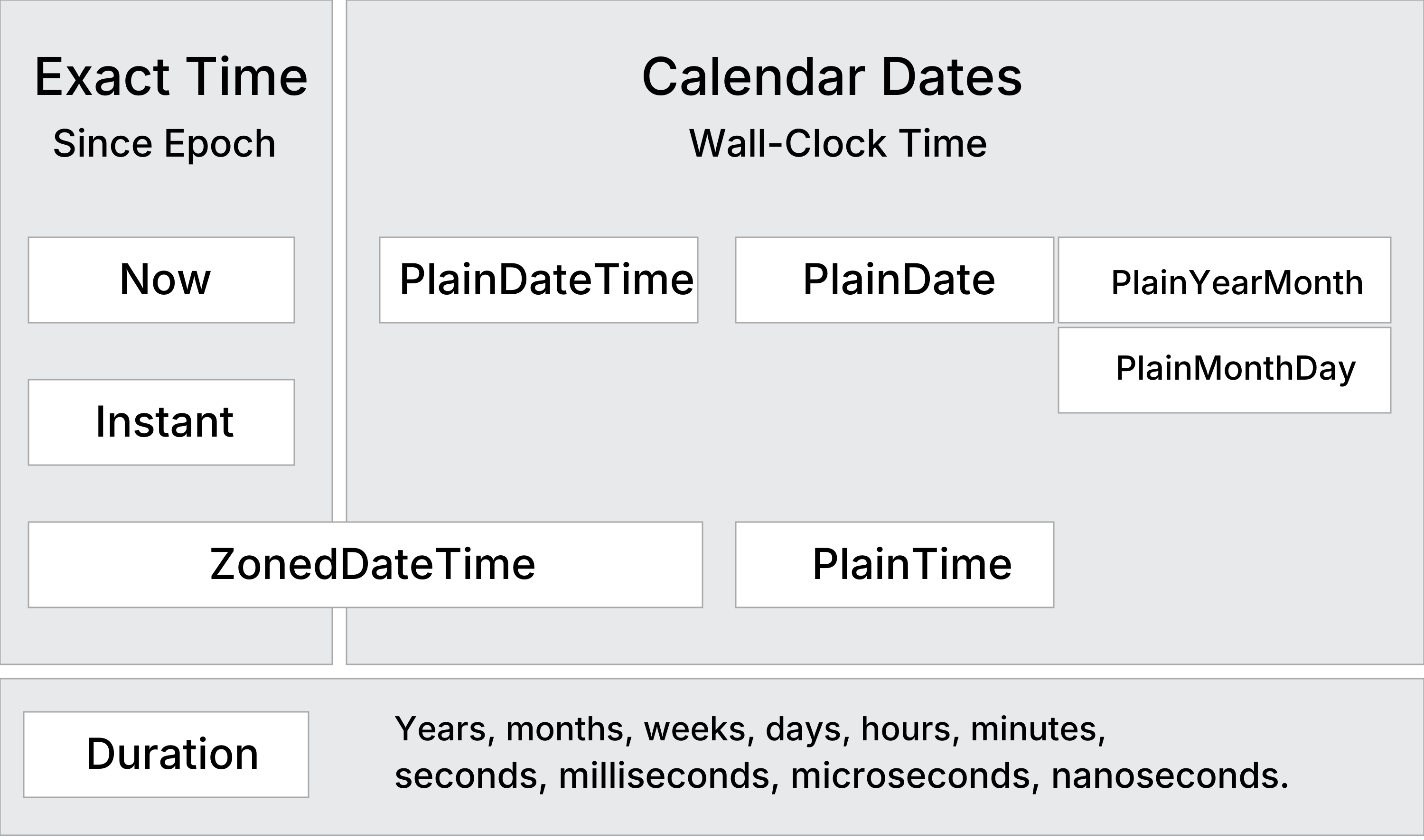
| Instant | Exact Moment in UTC time |
| PlainDateTime | Plain Date and Time (No Timezone) |
| ZonedDateTime | Local Date and Time (+ Time Zone) |
When to Use ZonedDateTime
- International applications.
- Booking systems.
- Flight or travel systems.
- Applications that must handle DST correctly.
- Any system where time zones matter.
Temporal ZonedDateTime Methods
| Col 1 | Col 2 |
|---|---|
| Constructing | Description |
| new | Creates a ZonedDateTime object |
| from() | Creates a ZonedDateTime object from an object or a string |
| Converting | |
| getTimeZone Transition() | Returns a ZonedDateTime object representing the closest instant after or before this instant |
| toInstant() | Returns a Instant object representing this date-time |
| toPlainDate() | Returns a PlainDate object representing this date-time |
| toPlainDateTime() | Returns a PlainDateTime object representing this date-time |
| toPlainTime() | Returns a PlainTime object representing this date-time |
| startOfDay() | Returns a ZonedDateTime representing the first instant of this date |
| Updating | |
| with() | Returns a ZonedDateTime with specified fields modified |
| withCalendar() | Returns a ZonedDateTime with a different calendar system |
| withPlainTime() | Returns a ZonedDateTime the time part replaced by a new time |
| withTimeZone() | Returns a ZonedDateTime representing this date in a new time zone |
| Arithmetic | |
| add() | Returns a ZonedDateTime with a duration added |
| subtract() | Returns a ZonedDateTime with a duration subtracted |
| round() | Returns a ZonedDateTime rounded to a given unit |
| Comparing | |
| compare() | Returns -1, 0, or 1 from comparing two dates |
| equals() | Returns true if two ZonedDateTime objects are identical |
| since() | Returns the difference from another date |
| until() | Returns the difference until another date |
| Formatting | |
| toJSON() | Returns an ISO 8601 string for JSON serialization |
| toLocaleString() | Returns a language-sensitive representation of the date |
| toString() | Returns an ISO 8601 string representation |
| valueOf() | Throws a TypeError (prevents temporals from being converted to primitives) |
Temporal ZonedDateTime Properties
| Col 1 | Col 2 |
|---|---|
| Property | Description |
| calendarID | Calendar system identifier ("iso8601") |
| day | The day as an integer (1-31) |
| dayOfWeek | The day of the week as an integer (1 = Monday) |
| dayOfYear | The ordinal day of the year |
| daysInMonth | The total number of days in that month |
| daysInWeek | The total number of days in that week |
| daysInYear | The total number of days in that year |
| epochMilliseconds | Number of milliseconds since Unix epoch |
| epochNanoseconds | Number of nanoseconds since Unix epoch |
| era | The era name of the calendar, if applicable ("gregory") |
| eraYear | The year within the era, if applicable |
| hour | The hour as an integer (0-23) |
| hoursInDay | Hours in this day in this time zone(0-25) |
| inLeapYear | A boolean indicating if the date falls in a leap year |
| microsecond | The microsecond as an integer (0-999) |
| millisecond | The millisecond as an integer (0-999) |
| minute | The minute as an integer (0-59) |
| month | The month as an integer (1-12) |
| monthCode | A calendar-specific string code for the month ("M01") |
| monthsInYear | The total number of months in that year |
| nanosecond | The nanosecond as an integer (0-999) |
| offset | Offset used to interpret this instant (+HH:mm:ss.sssssssss) |
| offsetNanoseconds | Offset used to interpret this instant in nanoseconds |
| second | The second as an integer (0-59) |
| timeZoneId | Time zone identifier used to interpret this instant |
| weekOfYear | The week number within the year |
| year | The year as an integer |
| yearOfWeek | The year that the week belongs to |
Display All Properties
const zoned = Temporal.ZonedDateTime.from("2026-05-17T14:30:00[Europe/Oslo]");