Temporal is based on the following standards:
| Col 1 | Col 2 |
|---|---|
| Name | Description |
| ISO 8601 Date/Time | International standard |
| ISO 8601 Duration | ISO 8601 duration codes |
| RFC 3339 Date/Time | Internet standard |
| RFC 9557 Date/Time | Temporal standard |
| RFC 5545 iCalendar | The iCalendar data format |
| JavaScript Calendars | Internet calendar systems |
The ISO 8601 Standard
ISO 8601 is the International Standard for representing dates and times.
It is a machine-readable text format in the form YYYY-MM-DDThh:mm:ssZ.
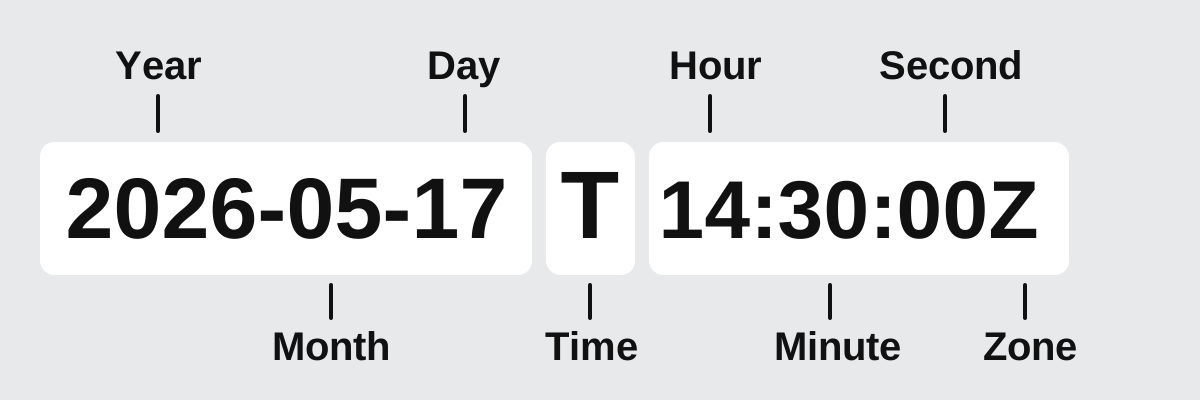
ISO 8601 was designed to eliminate confusion caused by regional date variations.
It follows a "largest to smallest" hierarchy (year, month, day, hour, minute, second) which ensures that dates are alphabetically sortable.
Note: ISO 8601 avoids confusion between regional formats like: MM/DD/YYYY (US format) DD/MM/YYYY (European format)
ISO 8601 Strings
An ISO 8601 string represents dates and times in a structured and sortable format:
| Col 1 | Col 2 |
|---|---|
| Format | Description |
| YYYY | A 4-digit year |
| MM | 2-digit month |
| DD | 2-digit day |
| T | Separator for time |
| hh | Hour |
| mm | Minute |
| ss | Second |
| Z | Zero (Zulu) time Zone |
Examples
| Col 1 | Col 2 | Col 3 |
|---|---|---|
| Format | Format | Example |
| Date (4-digit year) | YYYY-MM-DD | 2026-05-17 |
| Time (24 hour) | hh:mm:ss | 14:30:00 |
| Date & Time | YYYY-MM-DDThh:mm:ssZ | 2026-05-17T14:30:00Z |
| Date & Time UTC | YYYY-MM-DDThh:mm:ssZ | 2026-05-17T14:30:00Z |
| Date & Time + Offset | YYYY-MM-DDThh:mm:ss±hh:mm | 2026-05-17T14:30:00+01:00 |
| Week Date | YYYY-Www-D | 2026-W20-7 |
| Ordinal (001-366) | YYYY-nnn | 2026-074 |
ISO 8601 Duration Codes
An ISO 8601 duration represent lengths of time.
It uses a standard format starting with ±P (Period), followed by the structure nYnMnDTnHnMnS.
| Col 1 | Col 2 |
|---|---|
| Code | Description |
| ± | Optional positive/negative duration (default is +). |
| P | Duration designator (for period) |
| nY | Number of calendar years |
| nM | Number of calendar months |
| nW | Number of weeks |
| nD | Number of calendar days |
| T | Time designator (precedes time components) |
| nH | Number of hours |
| nM | Number of minutes |
| nS | Number of seconds |
Syntax
±P nY nM nW nD T nH nM nS
Example
P3Y6M4DT12H30M5S
More Examples
| Col 1 | Col 2 |
|---|---|
| Duration | Code |
| 1 Day | P1D |
| 45 Minutes | PT45M |
| 1 Year, 2 Months, 3 Days | P1Y2M3D |
| 4 Hours, 5 Minutes, 6 Seconds | PT4H5M6S |
| 2.5 Hours | PT2H30M |
| 5 Weeks | P5W |
Usage Rules
- Time Separator If you have hours, minutes, or seconds, you must use the T separator, or the code will be invalid (e.g. PT3H not P3H).
- Optionality Components are optional, but at least one must be present after P or T.
- Order The order must be preserved: P-> Y-> M-> W-> D-> T-> H-> M-> S.
- Decimal fractions You can use decimal points for the smallest unit, like PT0.0021S for 2.1 milliseconds.
The RF 3339 Format
RFC 3339 is the Internet Standard for Date and Time Formats.
It is a Subset of ISO 8601 designed for use in Internet protocols.
| Col 1 | Col 2 |
|---|---|
| Feature | Description |
| Format | Follows the ISO pattern YYYY-MM-DDThh:mm:ssZ |
| Time Zones | Requires a Z for time zone UTC or an offset (+05:00) |
| T Separator | Allows the "T" separator to be replaced by " " for readability |
| Web APIs | The default format for timestamps in JSON and RESTful APIs |
| Programming | Modern languages have bult-in support like toISOString() |
The RFC 9557 Format
RFC 9557 is the primary format used by JavaScript Temporal to represent dates.
| Col 1 | Col 2 | Col 3 | Col 4 |
|---|---|---|---|
| Feature | ISO 8601 | RFC 3339 | RFC 9557 |
| Format | YYYY-MM-DDThh:mm:ssZ | Same | Same |
| UTC Offset | Yes | Yes | Yes |
| IANA Zone | No | No | [America/New_York] |
| Calendars | ISO only | ISO only | [u-ca=hebrew] |
| Compabile | The Standard | Subset of ISO 8601 | Extends 3339 |
Note: RFC 9557 was created because ISO 8601 and RFC 3339 did not contain enough information to determine the geographical time zone or handle future DST (Daylight Saving Time) changes.
RFC 5545 iCalendar
RFC 5545 is the official internet standard for the iCalendar data format. It defines how calendar systems should store and share calendar data like meetings, tasks, and free/busy times using plain text files.
iCalendar is text-based. It Uses readable lines of text encoded in UTF-8.
iCalendar is is application independent. It works across different apps like Apple Calendar, Google Calendar, and Microsoft Outlook.
Examples
BEGIN:VCALENDAR

VERSION:2.0

PRODID:-//Example Corp//NONSGML Calendar App//EN

CALSCALE:GREGORIAN

METHOD:PUBLISH

BEGIN:VEVENT

UID:uid123456789@example.com

DTSTAMP:20260810T120000Z

ORGANIZER;CN=John Doe:mailto:john.doe@example.com

DTSTART:20260812T140000Z

DTEND:20260812T150000Z

SUMMARY:Project Kickoff Meeting

DESCRIPTION:Initial team synchronization and roadmap review.

LOCATION:Conference Room A

STATUS:CONFIRMED

CLASS:PUBLIC

END:VEVENT

END:VCALENDAR
| Col 1 | Col 2 |
|---|---|
| Field | Description |
| BEGIN:VCALENDAR | Required. Begins a calendar object. |
| VERSION:2.0 | Required. Specifies compliance with RFC 5545. |
| PRODID | Required. -//Organization//Product//Language. |
| BEGIN:VEVENT | Required. Begins a single calendar event. |
| UID | A globally unique event identifier to prevent duplicates. |
| DTSTAMP | The exact date and time the file was generated. |
| ORGANIZER | Defines who is hosting or managing the event. |
| DTSTART | Event start time (YYYYMMDDTHHMMSSZ in UTC). |
| DTEND | Event end time (YYYYMMDDTHHMMSSZ in UTC). |
| SUMMARY | The title of the calendar event. |
| DESCRIPTION | The detailed notes or body text of the event. |
| LOCATION | The location of the event. |
| CLASS | PUBLIC, PRIVATE or CONFIDENTIAL. |
| STATUS | TENTATIVE, CONFIRMED or CANCELLED. |
| END:VEVENT | Required. Ends a single calendar event. |
| END:VCALENDAR | Required. Ends a calendar object. |
Calendar Systems in JavaScript
- Temporal supports multiple calendar systems
- The calendars are based on the Unicode CLDR standard
- They are used with the Intl API.
- The default is iso8601.
- Calendars affect how dates are interpreted and displayed.
- Use
[u-ca=calendar]to specify a calendar.
Supported Calendar Identifiers
| Col 1 | Col 2 | Col 3 | Col 4 |
|---|---|---|---|
| Calendar ID | Name | Region | Description |
| iso8601 | ISO 8601 | Worldwide | The default calendar used by Temporal |
| gregory | Gregorian | Worldwide | The most widely used civil calendar today |
| buddhist | Buddhist | Thailand | A different year numbering system than Gregorian |
| chinese | Chinese | China | A lunisolar calendar used for traditional festivals |
| coptic | Coptic | Egypt | Used by the Coptic Orthodox Church |
| dangi | Dangi | Korea | Traditional Korean lunisolar calendar |
| ethiopic | Ethiopic | Ethiopia | A calendar with 13 months |
| ethioaa | Ethiopic AA | Ethiopia | Alternative Ethiopic era |
| hebrew | Hebrew | Israel | A lunisolar calendar used in Jewish traditions |
| indian | Indian (Saka) | India | The official civil calendar of India |
| islamic | Islamic | Middle East | A lunar calendar used in Islamic countries |
| islamic-umalqura | Umm al-Qura | Saudi Arabia | The official Saudi calendar |
| japanese | Japanese | Japan | Based on imperial eras |
| persian | Persian | Iran | A solar calendar with high accuracy |
| roc | Republic of China | Taiwan | Used in Taiwan (Minguo calendar) |
Calendar Systems Explained
A calendar system defines how dates are calculated.
Different cultures use different calendars.
Solar Calendars
Based on the Earth's orbit around the sun.
- Gregorian
- ISO 8601
- Persian
These calendars track seasons accurately.
Lunar Calendars
Based on the phases of the moon.
- Islamic
Lunar calendars have shorter years.
Lunisolar Calendars
Combine solar and lunar cycles.
- Chinese
- Hebrew
- Dangi
They adjust months to stay aligned with seasons.
Era-Based Calendars
Use eras instead of a continuous year count.
- Japanese
- ROC (Taiwan)
Using Calendars in Temporal
The from() method supports calendars using the [u-ca=calendar] syntax or a calendar property in objects.
Examples
Temporal.PlainDate.from("2026-05-17[u-ca=japanese]")