Change Platform:
Clone a Fork from GitHub
Now we have our own fork, but only on GitHub. We also want a clone on our local Git to keep working on it.
A clone is a full copy of a repository, including all logging and versions of files.
Move back to the original repository, and click the green "Code" button to get the URL to clone:
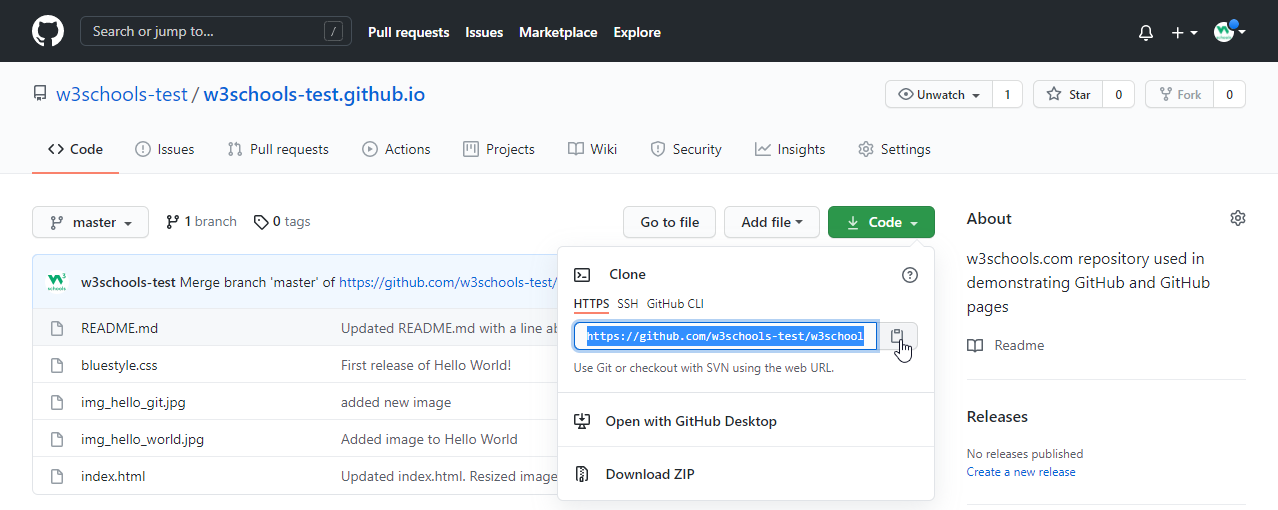
Open your Git bash and clone the repository:
Example
git clone https://github.com/w3schools-test/w3schools-test.github.io.git
Cloning into 'w3schools-test.github.io'...
remote: Enumerating objects: 33, done.
remote: Counting objects: 100% (33/33), done.
remote: Compressing objects: 100% (15/15), done.
remote: Total 33 (delta 18), reused 33 (delta 18), pack-reused 0
Receiving objects: 100% (33/33), 94.79 KiB | 3.16 MiB/s, done.
Resolving deltas: 100% (18/18), done.
Take a look in your file system, and you will see a new directory named after the cloned project:
Example
ls
w3schools-test.github.io/
Note: To specify a specific folder to clone to, add the name of the folder after the repository
URL, like this:git clone https://github.com/w3schools-test/w3schools-test.github.io.git myfolder
Navigate to the new directory, and check the status:
Example
cd w3schools-test.github.io
git status
On branch master
Your branch is up to date with 'origin/master'.

nothing to commit, working tree clean
And check the log to confirm that we have the full repository data:
Example
git log
commit facaeae8fd87dcb63629f108f401aa9c3614d4e6 (HEAD -> master, origin/master, origin/HEAD)
Merge: e7de78f 5a04b6f
Author: w3schools-test <test@w3schools.com>
Date:   Fri Mar 26 15:44:10 2021 +0100

    Merge branch 'master' of https://github.com/w3schools-test/hello-world

commit e7de78fdefdda51f6f961829fcbdf197e9b926b6
Author: w3schools-test <test@w3schools.com>
Date:   Fri Mar 26 15:37:22 2021 +0100

    Updated index.html. Resized image

.....
Now we have a full copy of the original repository.
Configuring Remotes
Basically, we have a full copy of a repository, whose origin we are not allowed to make changes to.
Let's see how the remotes of this Git is set up:
Example
git remote -v
origin  https://github.com/w3schools-test/w3schools-test.github.io.git (fetch)
origin  https://github.com/w3schools-test/w3schools-test.github.io.git (push)
We see that origin is set up to the original "w3schools-test" repository, we also want to add our own fork.
First, we rename the original origin remote:
Example
git remote rename origin upstream
git remote -v
upstream        https://github.com/w3schools-test/w3schools-test.github.io.git (fetch)
upstream        https://github.com/w3schools-test/w3schools-test.github.io.git (push)
Then fetch the URL of our own fork:
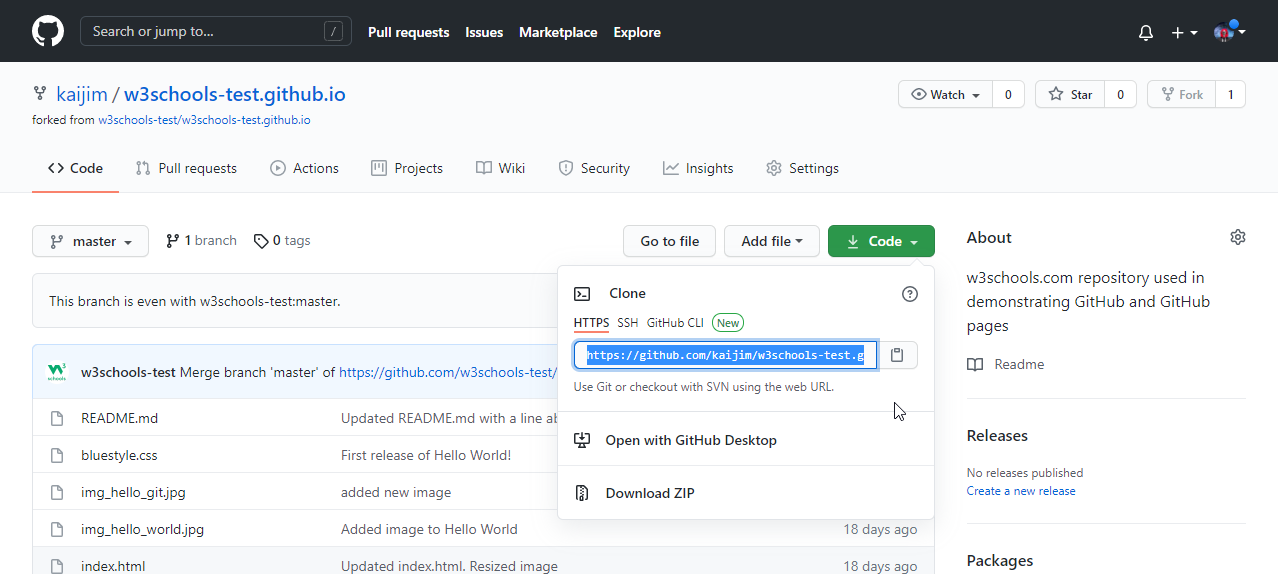
And add that as origin:
Example
git remote add origin https://github.com/kaijim/w3schools-test.github.io.git
git remote -v
origin  https://github.com/kaijim/w3schools-test.github.io.git (fetch)
origin  https://github.com/kaijim/w3schools-test.github.io.git (push)
upstream        https://github.com/w3schools-test/w3schools-test.github.io.git (fetch)
upstream        https://github.com/w3schools-test/w3schools-test.github.io.git (push)
Note: According to Git naming conventions, it is recommended to name your own repository
origin, and the one you forked forupstream
Now we have 2 remotes:
origin- our ownfork, where we have read and write accessupstream- the original, where we have read-only access
Now we are going to make some changes to the code. In the next chapter, we will cover how we suggest those changes to the original repository.