Linear Search
Linear search (or sequential search) is the simplest search algorithm. It checks each element one by one.
{{ msgDone }}
Run the simulation above to see how the Linear Search algorithm works.
This algorithm is very simple and easy to understand and implement.
How it works:
- Go through the array value by value from the start.
- Compare each value to check if it is equal to the value we are looking for.
- If the value is found, return the index of that value.
- If the end of the array is reached and the value is not found, return -1 to indicate that the value was not found.
Note: If the array is already sorted, it is better to use the much faster Binary Search algorithm that we will explore on the next page.
Implement Linear Search in Python
In Python, the fastest way check if a value exists in a list is to use the in operator.
Example
mylist = [3, 7, 2, 9, 5, 1, 8, 4, 6]

if 4 in mylist:
  print("Found!")
else:
  print("Not found!")
But if you need to find the index of a value, you will need to implement a linear search:
Example
def linearSearch(arr, targetVal):
  for i in range(len(arr)):
    if arr[i] == targetVal:
      return i
  return -1

mylist = [3, 7, 2, 9, 5, 1, 8, 4, 6]
x = 4

result = linearSearch(mylist, x)

if result != -1:
  print("Found at index", result)
else:
  print("Not found")
To implement the Linear Search algorithm we need:
- An array with values to search through.
- A target value to search for.
- A loop that goes through the array from start to end.
- An if-statement that compares the current value with the target value, and returns the current index if the target value is found.
- After the loop, return -1, because at this point we know the target value has not been found.
Linear Search Time Complexity
If Linear Search runs and finds the target value as the first array value in an array with (n) values, only one compare is needed.
But if Linear Search runs through the whole array of (n) values, without finding the target value, (n) compares are needed.
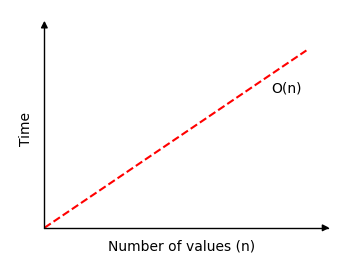
This means that time complexity for Linear Search is: ( O(n) )
If we draw how much time Linear Search needs to find a value in an array of (n) values, we get this graph: