
Histogram
A histogram is a graph showing frequency distributions.
It is a graph showing the number of observations within each given interval.
Example: Say you ask for the height of 250 people, you might end up with a histogram like this:
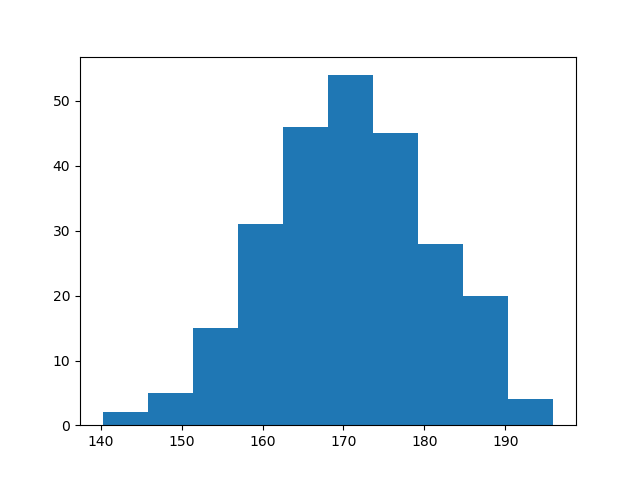
You can read from the histogram that there are approximately:
2 people from 140 to 145cm 5 people from 145 to 150cm 15 people from 151 to 156cm 31 people from 157 to 162cm 46 people from 163 to 168cm 53 people from 168 to 173cm 45 people from 173 to 178cm 28 people from 179 to 184cm 21 people from 185 to 190cm 4 people from 190 to 195cm
Create Histogram
In Matplotlib, we use the hist() function to create histograms.
The hist() function will use an array of numbers to create a histogram, the array is sent into the function as an argument.
For simplicity we use NumPy to randomly generate an array with 250 values, where the values will concentrate around 170, and the standard deviation is 10. Learn more about Normal Data Distribution in our Machine Learning Tutorial.
Example
  import numpy as np

x =
  np.random.normal(170, 10, 250)

print(x)
The hist() function will read the array and produce a histogram:
Example
import matplotlib.pyplot as plt
import numpy as np

x =
np.random.normal(170, 10, 250)

plt.hist(x)
plt.show()